


Check the authenticity of your Spotler ID activation email
To protect your account from phishing attempts, you can confirm that your activation email is genuine.
Use the information on this page to verify the details of the activation email you received. Make sure the information matches before proceeding.
Details of the activation email
Below are the exact details you should see in the email:
- Sender name: Spotler ID
- Sender email address: account@spotler.cloud
- Subject: Activate your Spotler ID
- Preheader: Click the activation link to get started
Link behind the button:
https://id.spotler.cloud/realms/spotler/login-actions/action-token?(your personal key)
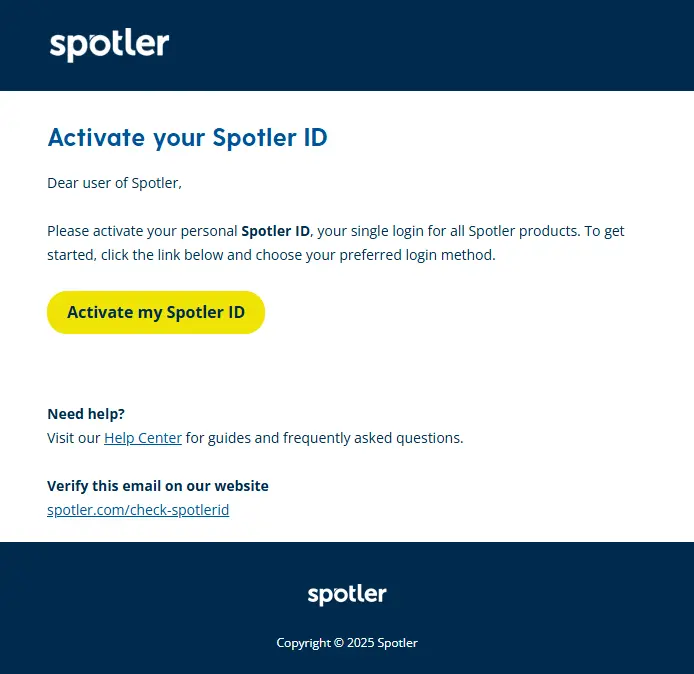
This is what the activation email looks like:
Prefer a different method?
If you do not want to use the link in the email, you can choose one of these alternatives:
Option 1: Trigger a new email via the login page
- Go to: https://login.spotler.cloud/
- Click on «Forgot password?«
- You will automatically receive a new email.
Option 2: Contact support
- Phone: +31 (0)88 – 103 09 09
- Email: support@spotler.com
- Our team will guide you through the activation process.
URLs you may encounter in this process
- Login page: https://login.spotler.cloud/ (this will redirect to a page that starts with https://id.spotler.cloud/)
- Application page: https://app.spotler.cloud
- Help Center information: https://cloud.spotler.help/
- Spotler website: https://spotler.com/