Our familiar overview of incoming emails, our inbox, is getting an AI facelift. Gmail is already experimenting with a Gemini integration that filters incoming emails and allows users to ask questions about their inbox. Microsoft has also integrated Copilot into Outlook. For email marketing, this means you need to take these new developments into account. But how do you do that, and what exactly has changed?
AI scans your inbox for valuable content
With the arrival of the AI Inbox, email recipients now have an AI assistant at their disposal. This assistant determines which email messages are relevant and provides quick summaries of their content. For readers, this is convenient. For marketers, this shift means the following:
Does your recipient’s inbox become a brand ambassador for your organisation?
Does the summary of your emails clearly communicate the value you create and what you have to offer?
Do you understand that email delivery is becoming more dynamic?
It’s no longer just about whether your emails are delivered, but also where they are delivered.
Are you paying enough attention to engagement?
Opens and clicks still matter, but the importance of engagement is increasing. This should be considered with every email you send.
Are you communicating a consistent story?
Emails from your organisation should present a coherent and consistent narrative in both visuals and messaging.
If you’re thinking, ‘These sound like familiar email marketing best practices,’ you’re absolutely right. Many of the considerations introduced by the AI Inbox are not new. They’re simply becoming more important than ever.
The AI Inbox Summary
Imagine you receive the following email from London Theatre:
Sender: London Theatre
Subject: The Comedy About Spies returns to the West End
Snippet: Secure your tickets today

If you ask an LLM how Gmail would summarise such an email, you might get something like: ‘Announcement and ticket sales for a West End comedy, with additional show recommendations.’ It’s an ultra-short summary that is added to the incoming email and is immediately visible to the recipient. Such a summary can determine whether the recipient decides to open the email or not.
Depending on the email client, a summary may contain slightly more detail: ‘Promotion for the return of The Comedy About Spies in the West End, with a call to book tickets, plus recommendations for other popular shows’
It’s definitely worth trying this yourself: how does AI summarise your email? This gives you insight into how AI interprets your message. In this case, the London Theatre email is a clear example of ‘promotion + call-to-action’. An inbox AI primarily categorises based on the intent of the email, not on style or visuals.
Tip: Send yourself a test email to your Outlook inbox. The AI assistant Microsoft Copilot is integrated into Outlook. In the top-right corner of your inbox, you’ll find a clear blue ‘Summarise’ button. Click it to see how AI summarises your email.
Dynamic Inbox Placement
As you know, it’s essential to have the following in order: SPF, DKIM, and DMARC. You also need to pay close attention to list hygiene, trackable links, and the sender score of your mailings. If you’re unsure about any of these, read our guide.
The ultimate guide to inbox placement.
However, even if you’re certain your email is being delivered, with the rise of the AI Inbox, you still don’t know where in the inbox it will appear. Gmail users have known for some time that emails are labelled with importance markers. These markers are partly based on which emails users open and how they interact with them. It won’t come as a surprise: with deeper AI integration, user behaviour will become even more important in determining where your email ends up.
In other words, the familiar chronological order you still see in Outlook today (with the newest emails at the top) will gradually be replaced. ‘Top picks’ will instead be determined by your inbox AI assistant.
Engagement was already important, but it is becoming even more important
The obvious question is: how do you ensure that your readers’ inbox AI assistant considers your email important? The answer is not surprising: make sure your readers interact with your emails. This was already important, but it’s becoming even more so. Engagement is right now and will, especially in the future, play a key role in inbox placement.
You can also ask an LLM how to make your emails more personal and how to increase engagement. For example, here’s the kind of feedback you might receive on the London Theatre email:
- It feels like a “broadcast,” not a conversation
The email talks at the reader, not with them: ‘Secure your tickets,’ ‘Don’t miss this,’ and ‘Book now,’ without any reference to who the reader is or why this is relevant to them. - No context or recognition
It doesn’t tap into situations such as a first trip to London, a weekend getaway, or being a regular theatre-goer. As a result, it lacks the feeling of ‘this is meant for me’. - Too much pushing, not enough helping
The email promotes one show and then adds six more, but doesn’t help the reader choose, compare, or understand what suits them. - No human voice
Although there are quotes, there is no real “person” behind the message: no recommendations, opinions, or experiences.
An LLM can be quite blunt, but it’s incredibly helpful when it comes to improving your emails. Personalisation, segmentation, making your copy more personal, and finding the right tone of voice are all ways to increase engagement.
In search of a consistent story
The inbox is getting a search bar. And just like in ChatGPT, you’ll be able to ask questions in natural language. For example: ‘Who was the plumber who gave me a quote for the bathroom renovation last year?’:
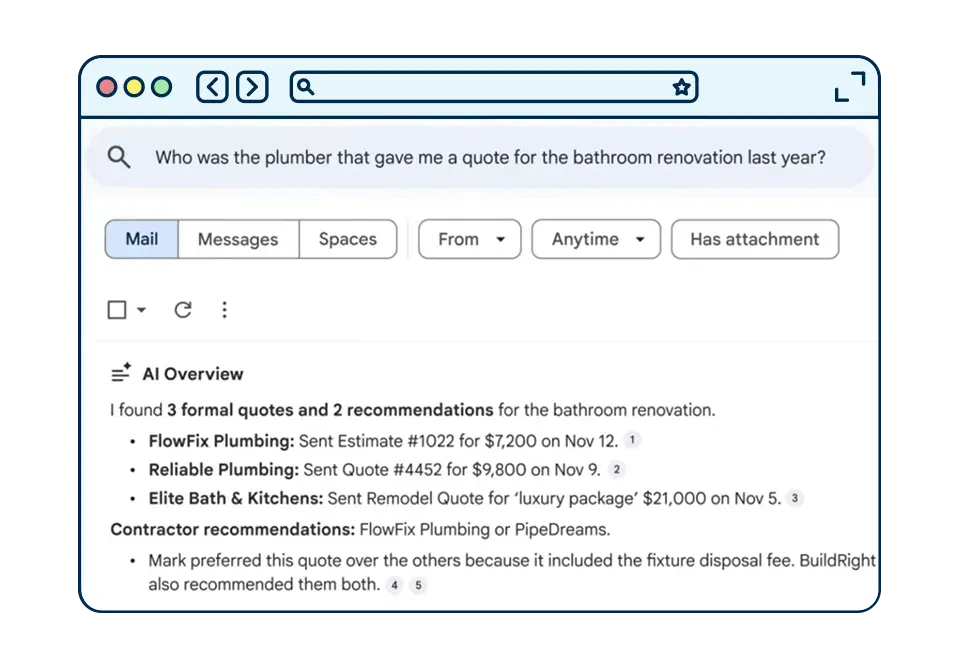
Your inbox fields and the content of your email need to better align with the NLQs LLMs use to search. An AI must be able to match your email to queries. To do this effectively, it’s important to keep the earlier-mentioned intent of an email in mind:
- Intent is inspiration: What is there to do at the London Theatre? Which shows are on in London this summer? What is currently the best show in the West End?
- Intent is comedy: Which fun comedy show is currently playing in London? Looking for a funny performance—any recommendations?
- Intent is ticket: Which West End tickets are currently available? Can you give me booking tips for a theatre in London?
If you then incorporate some of these words and phrases into your subject line, your snippet, and the first content block of your email, you’ll undoubtedly make your recipient’s AI assistant very happy.
Want to learn how Spotler can further support you with email marketing? Feel free to contact our sales advisory team!