





Accessible emails are easier for everyone to read, including the AI systems that increasingly filter and prioritise messages in modern inboxes.
Email accessibility has long been discussed as a way to ensure digital communication is usable for everyone. But as inbox providers rely more heavily on automation and machine learning to organise and prioritise messages, accessibility is becoming relevant for another reason.
Clear, structured emails are not just easier for people to read. They’re also easier for machines to understand.
And is now so important! In many cases, algorithms now process your email before your audience gets to see it, a topic we discussed in detail in our webinar AI in the Inbox.

What is email accessibility?
Accessibility in email means designing messages so that they can be used by people with a wide range of abilities, including those who rely on assistive technologies.
This includes tools such as:
- Screen readers
- Voice navigation
- High contrast display modes
According to the World Health Organization, around 1.3 billion people globally live with some form of disability, representing roughly one in six people worldwide. Many of these users rely on assistive technologies to interact with digital content.
Accessible design ensures these audiences can properly read and interact with emails.
This includes practices such as:
- Adding descriptive alt text to images
- Using clear link text instead of “click here”
- Maintaining sufficient colour contrast
- Organising content in a logical reading order
Beyond supporting accessibility needs, these practices also improve usability for everyone. Emails that are clear, structured and easy to navigate tend to perform better overall.
If you’re interested in practical examples, we recently explored accessible email design in more detail here.
AI is increasingly part of the inbox
At the same time, the way inboxes work has changed significantly.
Email providers such as Gmail and Outlook use machine learning systems to filter, categorise and prioritise incoming messages. These systems analyse a wide range of signals, including sender behaviour, engagement history and message content.
While marketers often focus on engagement signals, the structure and clarity of the email itself also play a role in how content is interpreted.
Just like screen readers, automated systems rely on clear signals to understand what a piece of content contains.
If an email is poorly structured, difficult to parse or overloaded with images and unclear links, it becomes harder for both humans and machines to interpret.
Understanding how these signals affect inbox placement has become an important part of modern email marketing.
AI now reads and summarises emails
AI is no longer only working behind the scenes to filter email. It’s also starting to interpret and summarise messages for users.
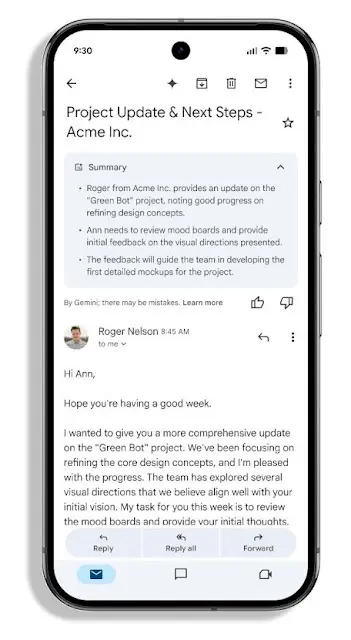
For example, Google has begun integrating its Gemini AI into Gmail to help users quickly understand long conversations. The system can generate summaries of email threads, highlighting key points and decisions so users don’t need to read every message in full.
In some cases, these summaries appear automatically at the top of emails when Gmail detects a longer conversation.
This changes how people are now starting to interact with email. Instead of reading every message in detail, many users will first see an AI-generated overview of the content.
For marketers, this has an important implication.
AI summarisation tools rely on the actual text and structure of an email to understand what the message contains. If an email is built entirely from images, with very little HTML text, the system has far less information to interpret.
In those cases, the AI may struggle to summarise the message correctly. Sometimes the only readable content is small fragments of HTML text, such as navigation links or footer copy.
This is another reason why clear structure and accessible email design matter. Emails that use proper headings, meaningful text and well-organised content are easier for both people and machines to understand.

Structured emails help both humans and machines
Well-structured emails are easier to interpret because they follow predictable patterns.
Clear headings, logical content hierarchy and meaningful links help both readers and technologies navigate the message.
Accessibility research supports this approach. Studies from digital accessibility organisation WebAIM highlight how screen readers rely heavily on semantic structure and descriptive links to interpret digital content correctly.
The same principles apply more broadly across modern inbox environments. Structured emails make it easier for technologies to understand the purpose and context of a message.
Industry initiatives are also working to improve standards in this area. Organisations such as the Email Markup Consortium focus on improving accessibility and consistency in email development across the industry.
Email accessibility best practices
Improving email accessibility doesn’t require a complete redesign of your email programme.
In many cases, small improvements to structure and content can make emails significantly easier to read for both people and machines.
Here are a few practical changes marketers can implement.
Use semantic heading structure
Headings help both readers and assistive technologies understand how content is organised. Instead of simply styling text to look like a heading, use proper semantic elements such as H1, H2 and H3 tags in your email code. Screen readers rely on these tags to allow users to navigate content quickly.
A clear heading hierarchy also makes it easier for automated systems to interpret the structure of your message.
Importance: For AI and humans
Write descriptive link text
Links should describe where they lead rather than relying on generic phrases like “click here” or “read more”.
For example:
Less accessible:
Click here to download our guide
Better:
Download the inbox placement guide
Screen readers often list links separately from the rest of the content. Descriptive links ensure users understand the destination without needing additional context.
Importance: For AI and humans
Add meaningful alt text to images
Alt text provides a text description of an image when the image cannot be displayed or when a screen reader is used.
This is particularly important in email, where images are frequently blocked by default. Alt text ensures the message still makes sense if images fail to load.
It’s also critical to not rely entirely on images to communicate key information. If an email is built mostly from images, important content may be inaccessible to both screen readers and AI systems analysing the message.
Importance: For AI and humans
Use simple, consistent layouts
Complex email layouts can create problems for assistive technologies because the reading order may not match the visual layout.
Keeping layouts simple and structured helps maintain a logical reading flow. Many accessibility specialists recommend using a single-column layout where possible, as it adapts more reliably across devices and screen readers.
Importance: For humans
Check colour contrast
Text should maintain sufficient contrast against the background to remain readable for users with visual impairments.
The Web Content Accessibility Guidelines (WCAG) recommend a contrast ratio of at least 4.5:1 for normal text and 3:1 for larger text. Ensuring adequate contrast improves readability for everyone, particularly when emails are viewed on mobile devices or in bright environments.
Research from Litmus shows that many marketing emails still miss basic accessibility practices such as descriptive alt text, logical structure and sufficient colour contrast.
Addressing these issues can significantly improve the usability of your campaigns.
Importance: For humans
Accessible emails are better emails
As inbox technology continues to evolve, accessibility is becoming more relevant for more than one reason.
Accessible emails reach wider audiences, provide better user experiences and are easier for modern technologies to interpret.
Clear structure, meaningful links and readable layouts help ensure your message can be understood by everyone who interacts with it.
And that now includes AI, which is busy organising and summarising today’s inboxes.
Making accessible emails easier
Putting accessibility best practices into action is much easier when your templates are built the right way from the start.
With Spotler Mail+, tools like the Brand Manager allow teams to create reusable templates with the correct structure, colours and components already in place. That makes it easier for marketers to build campaigns that stay consistent, readable and accessible.
