If you run a WordPress site, you’ve probably had this conversation: a customer says they never got their order confirmation, or a new user says the password reset link never showed up. You check the WordPress dashboard. Nothing looks wrong. The form submitted, the order went through, and the plugin shows no error. As far as your WordPress is concerned, it sent the email.
The problem here is that sent and delivered are two very different things. When WordPress tells you an email was sent, it does not automatically mean it was also delivered.
Why it matters
As of September 2026, sources say WordPress powers roughly 40.7% of all websites globally and holds around 58.9% of the CMS market and is still growing, which means this isn’t a niche problem. It’s the default state of an enormous share of the web’s transactional email.
The stakes also rise as your site grows. Since February 2024, Gmail and Yahoo expect anyone sending more than 5,000 emails a day to their users to authenticate with SPF, DKIM and DMARC, and to keep spam complaints below 0.3%. Microsoft has since introduced similar rules for Outlook.com. Mail that fails those checks can be sent to spam or rejected, and a busy shop or membership site reaches that volume sooner than you’d expect. Even below that volume, meeting the same standards improves your chances of reaching the inbox, as this WordPress deliverability guide also notes.
A growing number of WordPress sites are assembled with AI-assisted, “vibe coded” workflows, often, if not always, by people without a background in email sending. Sending is usually the last thing configured and the first thing that breaks.
WordPress email is unreliable by design
Out of the box, WordPress sends email with PHP’s basic mail() function, through the PHPMailer library it bundles. That hands each message to the local mail system on your web server, with no login, no signature and no proof that the server is allowed to send for your domain. Inbox providers have no reason to trust that, so a lot of that mail either bounces or lands in spam.
Three checks decide whether a mailbox provider believes an email really comes from you. A default WordPress setup typically fails or skips all of them:
- SPF: a DNS record that lists which servers may send email for your domain. A shared web server is rarely on that list, and its reputation depends on every other site hosted on it.
- DKIM: a digital signature added to each message, so the receiving server can verify that it came from your domain and wasn’t altered on the way. PHP mail doesn’t sign anything.
- DMARC: a policy that tells receiving servers what to do when SPF and DKIM checks fail, and sends you reports about it. Without a passing SPF or DKIM result that matches your domain, DMARC has nothing to work with.
That’s what unreliable by design means here. WordPress isn’t doing anything wrong: it simply isn’t built to authenticate email. Fixing it takes a proper sending service and some DNS work, and our guide on how to set up SPF, DKIM and DMARC walks you through it.
When you manage your website internally, unreliable email sending causes these issues:
- Poor deliverability: Order confirmations, password resets and account notifications either don’t arrive or land in spam.
- Trouble troubleshooting: When someone says they didn’t get an email, the default mail server gives you almost no information. Was it sent? Did it bounce?
- Contact form handling: WordPress plugins like Contact Form 7, Gravity Forms and similar plugins depend on the same server. If you don’t receive a form fill notification, how quickly can you follow up?
How an SMTP plugin and SendPro work together
You need two things to fix WordPress email, and they do different jobs:
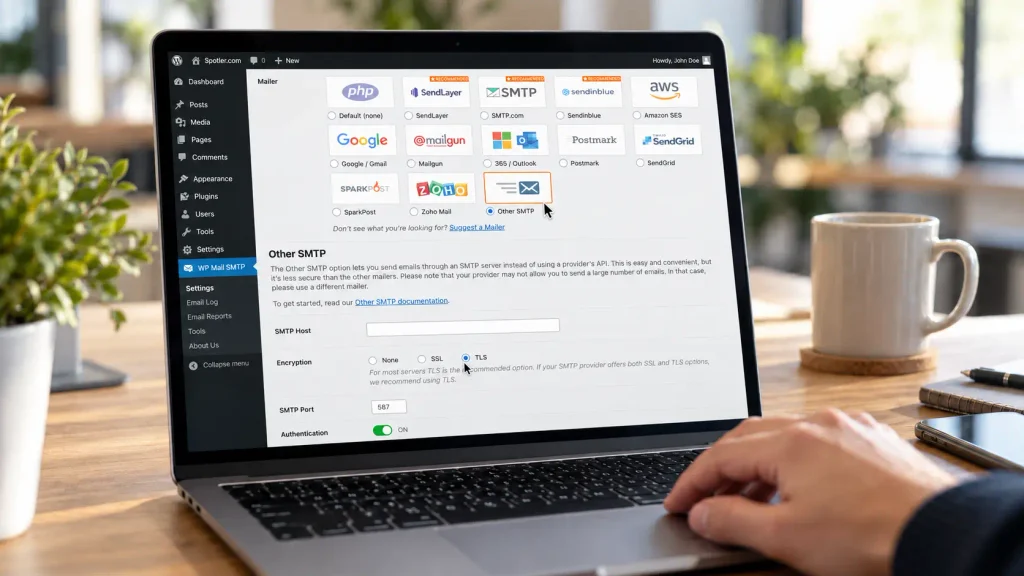
- The plugin is the connection. An SMTP plugin such as WP Mail SMTP or Easy WP SMTP replaces PHP mail inside WordPress. Every message your site creates is handed to an SMTP server with a username and password, instead of to the local mail system on your web server.
- SendPro is the sender. It’s the SMTP server at the other end. It signs your messages with DKIM, sends them from monitored infrastructure with SPF and DMARC set up for your domain, and keeps a record of what happened to every email.
Neither does the whole job alone. A plugin that points at your web host’s mail server, or at a personal mailbox, still sends without an authenticated domain or a reputation of its own, so you keep the deliverability problems and only change where they happen. SendPro without the plugin has no way to receive what WordPress sends, because WordPress would keep using PHP mail.
Together, the plugin lets you control things inside WordPress, such as the sender name and address, and SendPro takes care of deliverability and reporting. There’s a difference in what you can see, too. The plugin can only report that WordPress handed a message over. SendPro tells you what happened next.
What actually changes once WordPress mail runs through SendPro
SendPro sends transactional mail through infrastructure built and monitored for exactly this purpose. You authenticate your sending domain once, and from then on every message WordPress sends can be verified by the receiving server. SendPro is hosted in the EU, which matters for site owners who need to answer “where does our customer data go” without getting a complicated answer back.
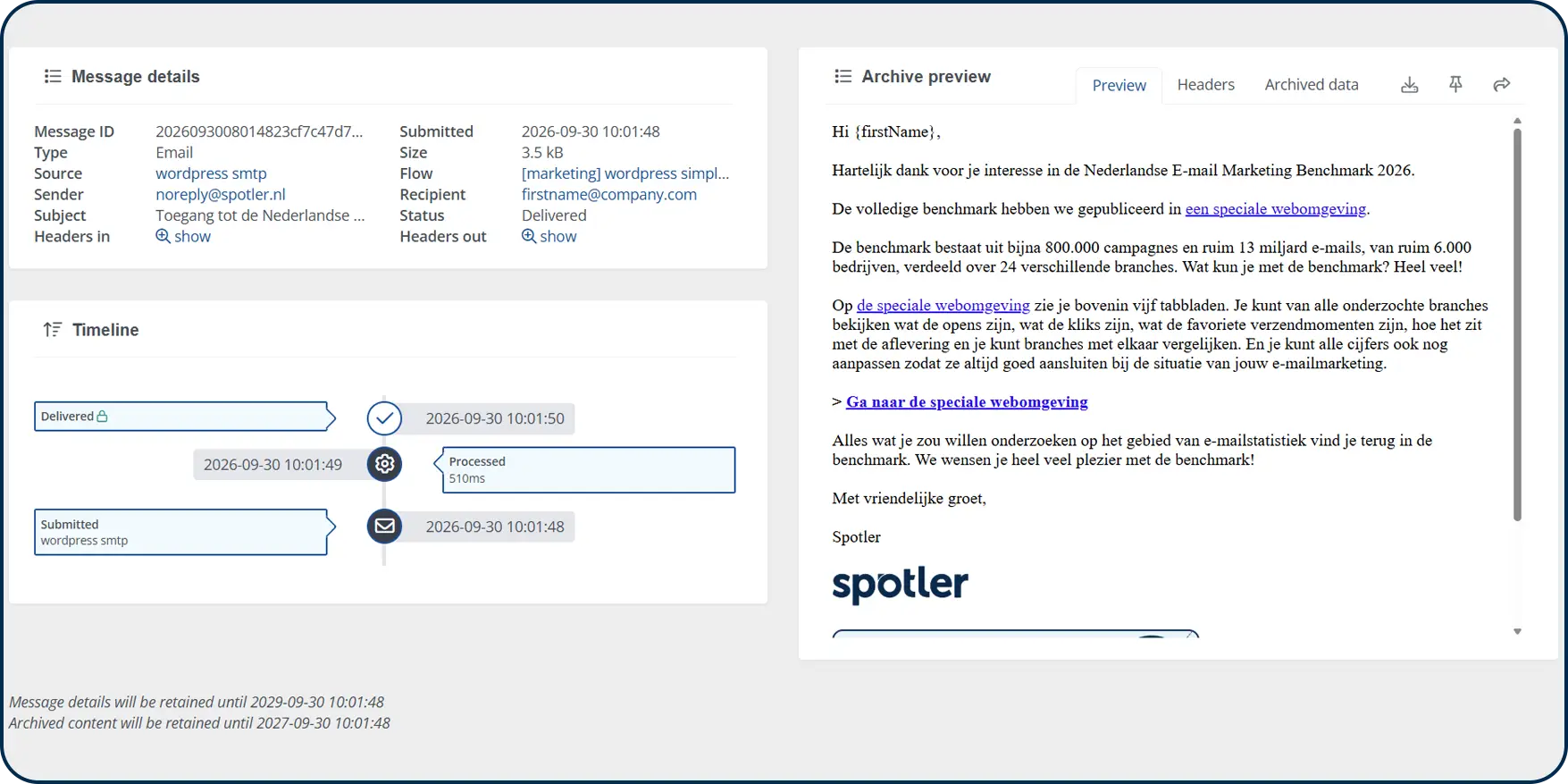
When it comes to the actual emails, you get full visibility into what happened to every message. Instead of “was it sent?”, you get a real answer: delivered, bounced, rejected; all with a timestamp and a reason. When a customer says they never got their password reset, you can check in seconds instead of guessing.
Lastly, you can turn on opens and clicks for flows where that data is useful (order confirmations, notifications) and leave them off where it isn’t (password resets, one-time codes) or isn’t allowed.
What this looks like in practice
A few concrete examples of where SendPro can add value to your WordPress site:
Contact form notifications
A visitor submits your website form. SendPro routes the internal notification to your team and the confirmation to the visitor, but you can design, track, and archive them differently. You have full control of how the notification ends up in the recipient’s inbox. Turn plain-text notifications into on-brand experiences for your customer, while sending a simple update email to your colleagues.
Bounces and delivery status
A WooCommerce order confirmation bounces because the customer mistyped their email address. Instead of that silently happening without you knowing, SendPro logs the bounce with a reason, so you (or your support team) can flag it and follow up.

SendPro Webhooks allow you to send that information right back to your webshop and contact database, so you won’t start sending more emails to a non-existing address. This helps you maintain a healthy domain reputation in the long run. Even better, SendPro Event Flows help you set up fallback automations to automate following up on hard bounced emails, by trying via SMS or sending an email to your team to follow up immediately.
Tracking
Order confirmation emails get opened, but does the tracking link inside ever get clicked? Engagement data is a useful indicator for website managers and marketing teams alike to decide whether post-purchase or post-form fill emails are working as intended.
Curious about best practices? Read my tips to create better order confirmations (2026 edition).
Getting started is easy
Setting SendPro up for a WordPress site takes about the same amount of effort as installing any SMTP plugin:
- Get started with SendPro for free
- Add the SPF, DKIM and DMARC records for your sending domain in your DNS.
- Install a free SMTP plugin such as WP Mail SMTP or Easy WP SMTP (if one isn’t already active).
- Create an SMTP source in SendPro
- Add your SendPro SMTP credentials to the plugin settings.
- Send a test email to confirm it’s routing correctly.
- Turn on tracking for the flows where it’s useful, and leave it off for the rest.