



An email bounce is a delivery failure: the receiving mail server refuses your message and sends back a rejection notice instead of putting it in the inbox. It’s one of the few unambiguous signals in email. Something was wrong with the address, the message, or your sending reputation, and the server said so out loud.
This guide explains what bounces are, how hard and soft bounces differ, how to calculate and interpret your bounce rate, which addresses to remove and when, and how to check whether a message is likely to fail before you send it. We’ve written it for anyone sending transactional or marketing email.
In short:
Handle your bounces with Spotler SendPro. Learn how.
When you send a message, your server opens an SMTP conversation with the recipient’s server and offers the message. The receiving server can accept it, defer it, or reject it. A bounce is that rejection, packaged up and returned to you as a non-delivery report (also called an NDR, a DSN, or a bounce message).
Two things make bounces useful. First, they’re machine-readable: every bounce carries a status code. Second, they’re feedback from a mailbox provider about your data quality. An email list that generates lots of bounces is a list that hasn’t been maintained properly.
The report contains an enhanced status code in the form X.Y.Z, (RFC 3463). The first digit is what matters most: 4 means a temporary problem, 5 means a permanent one. So 5.1.1 is “the mailbox does not exist” and 4.2.2 is “the mailbox is full”.
In reality, mail servers apply these codes inconsistently. Some providers return a 5.x.x for a genuinely temporary problem, and some hide the real reason behind a generic message to avoid helping spammers enumerate valid addresses.
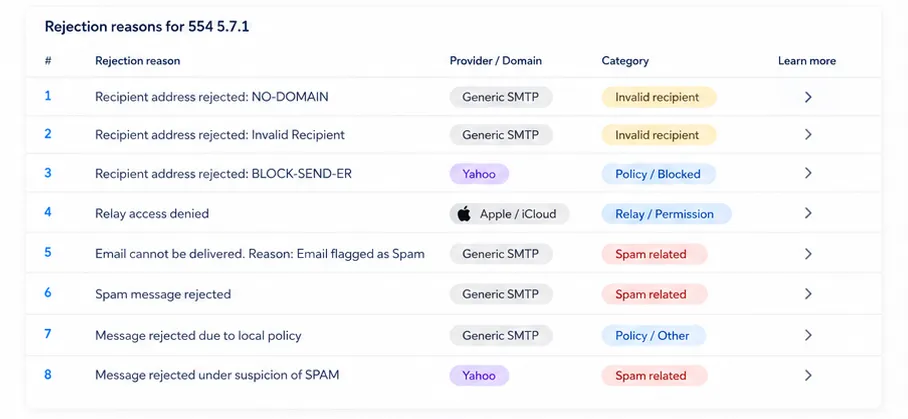
Most failures trace back to one of five causes:
The first two are about your data. The last two are about you.
The bounce message is addressed to your return path, which is the envelope sender rather than the friendly “From” address a recipient sees. If you’re sending from a personal mail client, that’s usually your own mailbox, failures land back there.
If you’re sending through an email platform or API, the return path points at the platform instead, which is how bounces get captured, categorised and reported rather than piling up unread. That’s the intended setup for anything sent at volume.
A correct-looking email address can still generate a bounce, because looks are only based on syntax. A perfectly formed address bounces when the local part is wrong (j.smith@ instead of john.smith@), when the domain has no valid MX record, when the mailbox has been deactivated, or when the domain has lapsed and is now parked.
There’s also a category that has nothing to do with the address at all. If the receiving server has decided your domain is untrustworthy, it may reject every message you send there with a permanent code, even to real people who want to hear from you. That’s a reputation problem.
A hard bounce is a permanent failure. The receiving server tells you delivery to this address will never succeed, no matter how many times you try. The majority are non-existent mailboxes.

It means the address is dead and should be treated as such from that moment on. Continuing to send to it does real damage: mailbox providers watch how often senders hit invalid addresses, because a high rate is one of the clearest indicators of a purchased, scraped or badly maintained contact list. Repeat offenders get throttled or filtered, and that affects delivery to your good addresses too.
One caveat: a small share of hard bounces are recoverable, because they’re typos. @gmial.com A hard bounce is a permanent failure and also an obvious fix. Handling that properly means keeping the failed address visible so someone can correct it at source, rather than silently deleting it.
A soft bounce is a temporary failure. The address is valid, and the server is willing to talk to you, but it can’t accept this message right now. Common causes are a full mailbox, a message over the size limit, a server that’s down, or a rate limit.

In a marketing context, soft bounces are mostly background noise. A handful per campaign is normal and needs no action, because sending platforms retry automatically over a defined window.
The exception is a sudden cluster at one domain. If a large batch of your messages to a single provider all soft-bounce at once, that’s rarely a coincidence. It usually means you’re being rate-limited, which is a throttle rather than a technical fault. In other words, the receiving server is only allowing x amount of emails per timeframe.
How to avoid being rate limited by Exchange Online? Use this guide on how to set up SendPro with Microsoft Exchange Online.
It means “not yet”, but “not yet” is not indefinite. A mailbox that has been full for three months belongs to someone who has stopped reading their email. Most platforms convert a soft bounce to a permanent one after a set number of consecutive failures, and if yours doesn’t do that automatically, set your own rule. Repeated soft bounces from the same address are a big disengagement signal.
Bounce rate is the share of your sent messages that came back as failures:
Bounce rate = (total bounces ÷ total messages sent) × 100
Most reporting also splits this into a hard bounce rate and a soft bounce rate, which is the more useful view. A 2% bounce rate made up almost entirely of soft bounces at one provider is a very different problem from 2% made up of invalid addresses.
No single published threshold exists. Providers do publish guidance on related signals: Google’s sender guidelines tell bulk senders to keep the spam rate reported in Postmaster Tools below 0.30%, and ideally below 0.10%. Use your own history and email benchmarks instead. Establish what normal looks like for the types of emails you’re sending. Some emails, even transactional, are accepted sooner than others.
Yes. Removing these contacts from a sending list is better implemented as suppression than deletion. The contact stays in your system so you know not to email it anymore. Deleting the contact does the opposite: the address comes back the next time someone syncs the list, and you bounce again.
Three things to get right:
gmial.com to gmail.com.You can’t know for certain in advance, because the only definitive test is delivery itself. You can get close, and you can stop most bounces from ever entering your list:
For a single address, send a real message and watch the result. For a campaign, send to a small sample first: a few hundred addresses spread across the major providers, ideally including some you control. Then look at the delivery report before releasing the rest.
Watch three things in that sample. The hard bounce rate tells you about list quality. Soft bounces concentrated at one domain tell you about throttling. And a bounce reason mentioning authentication, reputation, or policy tells you the problem isn’t the list at all, so sending the remaining 50,000 messages will make things worse rather than better.
Not usually, and this is where the common advice gets it backwards. Role addresses like info@, sales@ and support@ are shared mailboxes that almost always exist, so they hard-bounce less often than a guessed individual address such as firstname.lastname@.
The real risks are different. Role mailboxes are frequently monitored by teams with aggressive filtering, so messages get quietly binned rather than bounced. Some are recycled spam traps, which is far more damaging than a bounce because it hits your reputation directly with no visible failure to warn you. And they attract complaints, since nobody at a shared mailbox signed up for anything.
A bounce is the clearest feedback you can get when sending email. They are indicators of your data hygiene, but mainly a good source to get information from when it comes to your inbox placement abilities. By sorting all bounces into permanent or temporary, you will gain insight in how healthy your email activities are. Suppress the hard bounces account-wide, retry the soft bouncing ones within a sensible time, and update your data in your source system. Do that consistently, and you will increase your chances of actually ending up in the inbox.
Next step: look at what your current setup actually does with a hard bounce. If the answer is “logs it somewhere” rather than “suppresses it account-wide and tells the source system”, that’s the gap worth closing first. See how bounce management works in Spotler SendPro, or start a free 30-day trial and test it against your own sending.



